Introduction
Is your Mac or Linux machine slower than expected? Your disk might be the bottleneck. Slow storage can drag down everything from boot times to app launches, file transfers, and even gaming performance. Measuring disk speed helps you detect underperforming drives, validate upgrades, or compare external storage and cloud/VPS solutions.
This guide covers the best free tools for benchmarking disk performance on macOS and Linux, including GUI tools for Mac, cross-platform command-line tools, and Linux graphical benchmarks.

Measuring Disk Speed on macOS
Blackmagic Disk Speed Test
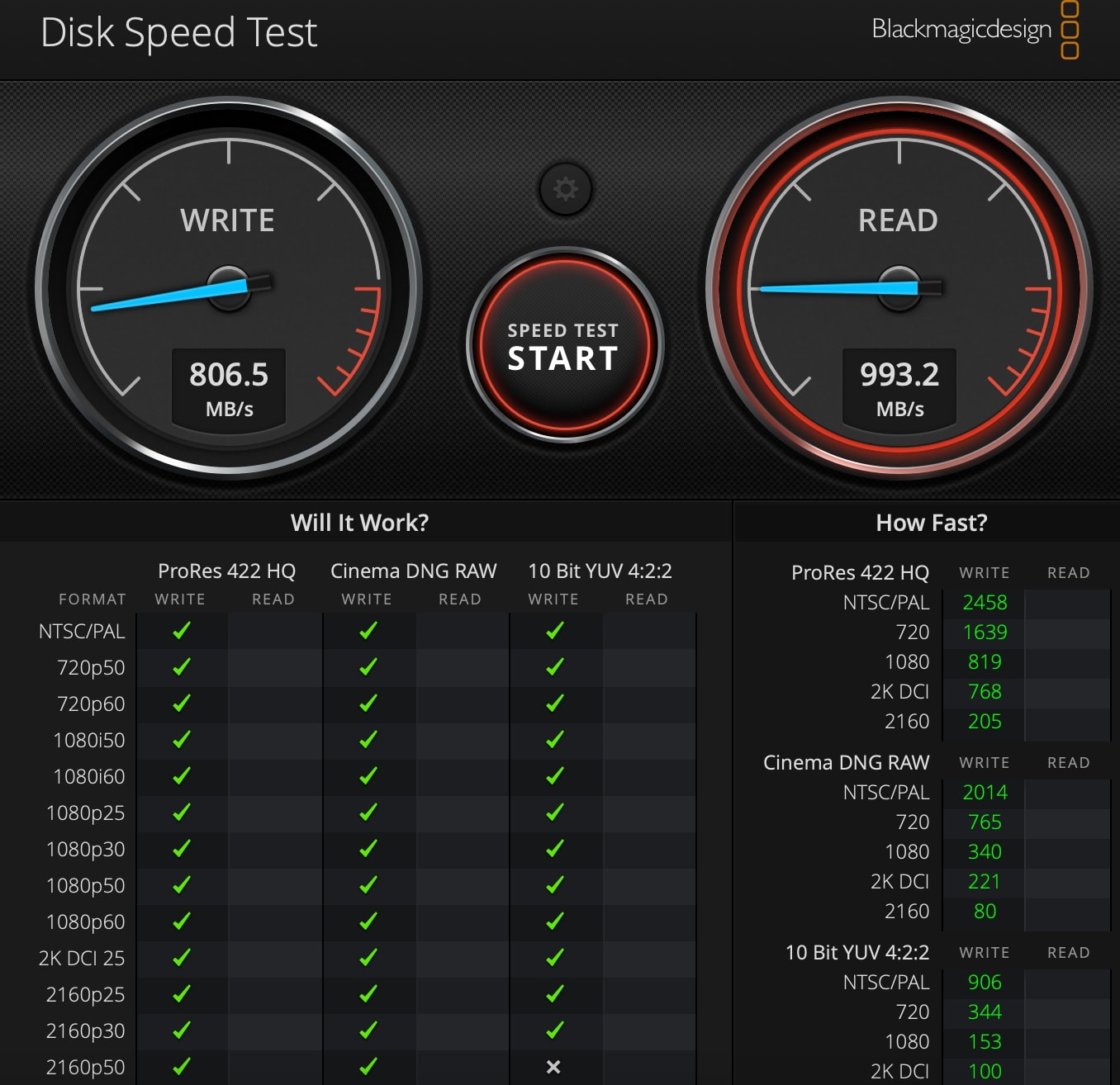
What it is: A free macOS app from Blackmagic Design, originally built for video editors to check if their storage can handle high-bitrate video workflows. It’s now a go-to tool for quick disk speed checks on internal and external drives.
Best for:
- Quick read/write speed tests
- Video professionals validating storage for 4K/8K workflows
- Users who want a simple, no-frills benchmark
 Blackmagic Disk Speed Test-2012 Macbook Pro Retina Stock disk
How to use it:
- Download from the Mac App Store.
- Launch the app and select your target drive from the dropdown menu.
- Click Start to begin the test.
Interpreting results:
The app displays read and write speeds in MB/s, along with estimated performance for common video formats (e.g., 4K DCI, 8K DCI). For most SSDs, expect 500–3500 MB/s depending on the interface (SATA, NVMe, USB). HDDs typically max out at 100–200 MB/s.
| Pros | Cons |
|---|---|
| Free and easy to use | No random I/O testing |
| Video-format benchmarks | Limited to macOS |
| Lightweight and fast | No detailed queue/thread options |
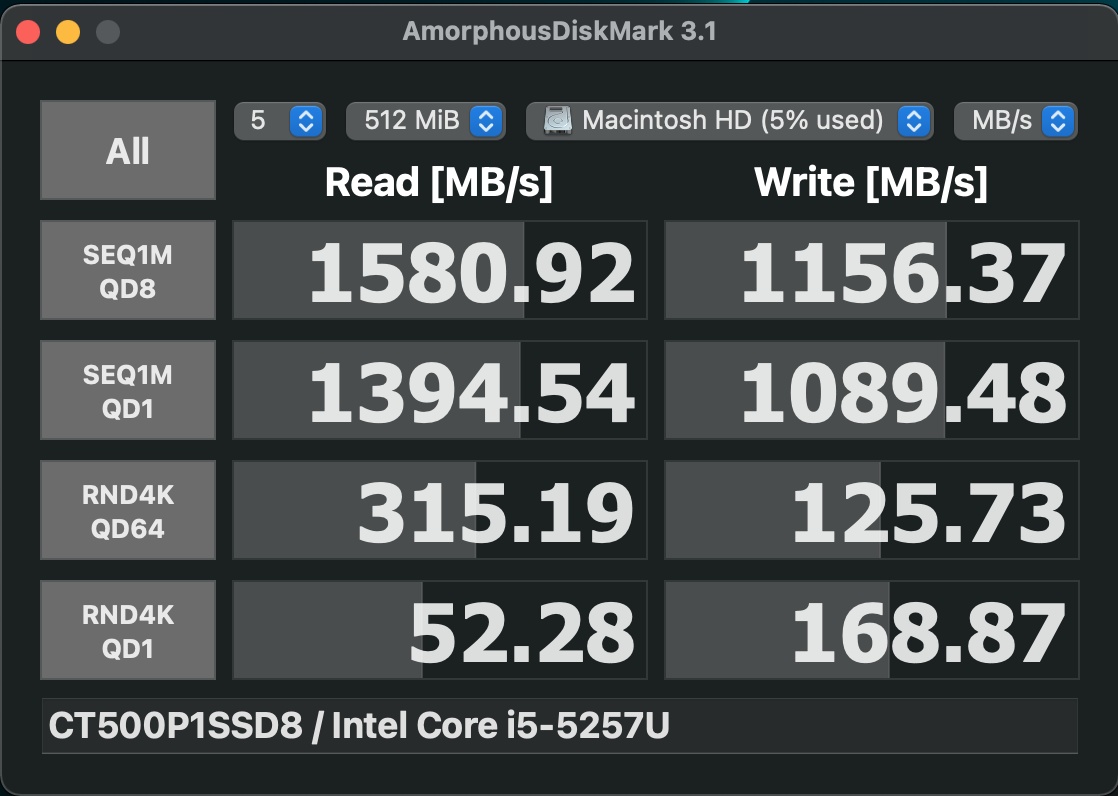
Amorphous Disk Mark
What it is: A macOS alternative to Windows’ CrystalDiskMark, offering sequential and random read/write tests with configurable queue depths and threads.
Best for:
- Users who need detailed benchmarking (e.g., comparing SSDs for OS or database use).
- Testing random I/O performance, critical for system responsiveness.
How to use it:
- Download from the developer’s website.
- Select your drive and test parameters:
- Sequential Q8T8: Simulates heavy workloads (e.g., video editing).
- Random Q1T1: Mimics everyday use (e.g., launching apps).
- Click Start to run the test.
Understanding queues and threads:
- Q8T8: 8 queues, 8 threads (high concurrency, like a busy server).
- Q1T1: 1 queue, 1 thread (single-task performance, like everyday use).
When to prefer Amorphous over Blackmagic:
- If you need random I/O metrics (Blackmagic only tests sequential).
- If you want Windows-style benchmarks for cross-platform comparisons.
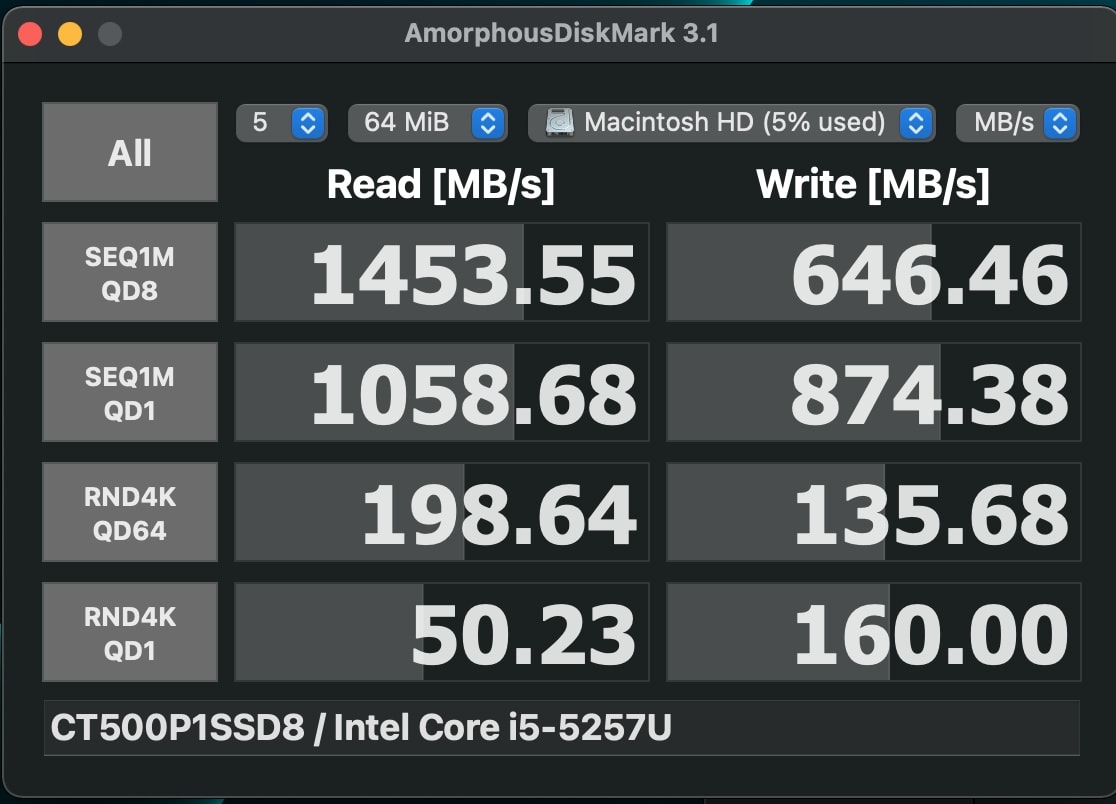 Amorphous Disk Mark on Mac
Pros and cons:
| Pros | Cons |
|---|---|
| Detailed sequential/random tests | Slightly more complex UI |
| Configurable queue/thread depth | macOS-only |
| Free and lightweight | No video-format benchmarks |
Measuring Disk Speed from the Command Line (Mac and Linux)
yabs — Yet Another Benchmarking Script
yabs Benchmark
What it is: A bash script that benchmarks CPU, memory, and disk. It is a comprehensive tool for VPS, servers, and Linux/macOS machines.
Best for:
- Quick, all-in-one benchmarking for remote or local systems.
- Users who prefer a single command to test performance.
How to run it:
curl -sL yabs.sh | bashInterpreting fio-based disk results:
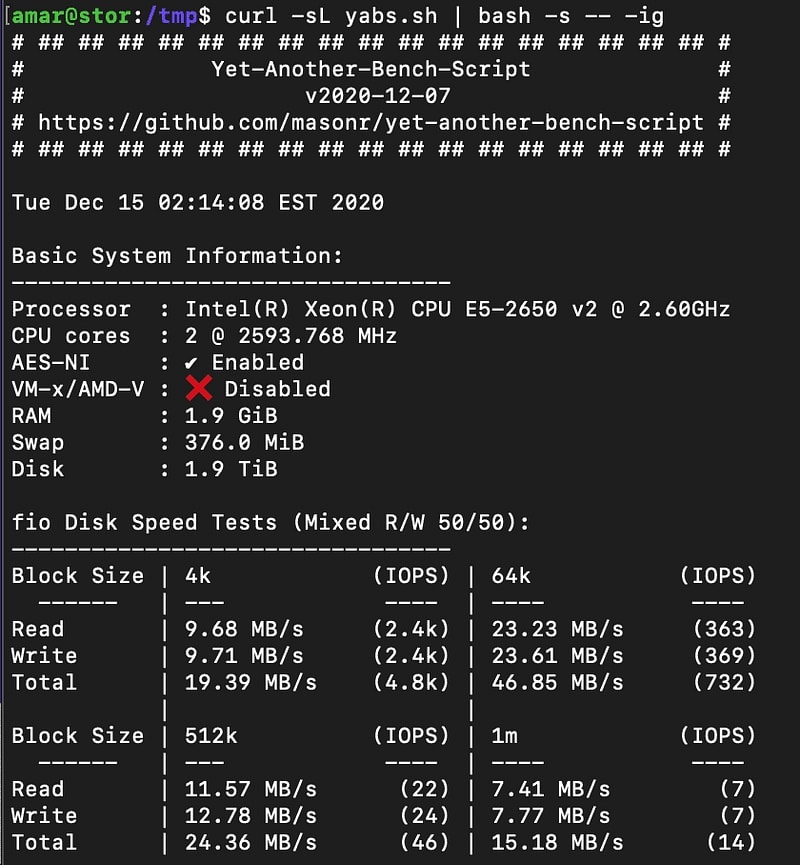
yabs provides detailed disk speed tests using fio, including sequential and random read/write speeds for different block sizes. It also gives IOPS (Input/Output Operations Per Second) for advanced users.
Example output from a remote server:
Pros and cons:
| Pros | Cons |
|---|---|
| Comprehensive (CPU, RAM, disk) | Requires curl and bash |
| Works on macOS and Linux | Some tests are Linux-focused |
Detailed fio-based results |
Needs internet to download script |

nc-Based Disk Speed Tests
What it is: A simple read/write speed test using nc (netcat) and dd. It is useful for network-attached or loopback testing.
Best for:
- Testing network storage or loopback devices.
- Users who need a quick, lightweight test without installing additional tools.
Basic example:
dd if=/dev/zero of=testfile bs=1M count=1024 oflag=directdd if=testfile of=/dev/null bs=1MPros and cons:
| Pros | Cons |
|---|---|
| No additional tools required | Limited to sequential tests |
| Works over network | Not as detailed as fio or yabs |

dd Direct Tests
What it is: A quick way to test sequential write and read speeds using the dd command.
Best for:
- Simple, built-in benchmarking on Unix systems.
- Users who want a no-frills test for basic performance checks.
Quick sequential write test:
dd if=/dev/zero of=~/testfile bs=1M count=1024 oflag=direct conv=fdatasyncQuick sequential read test:
dd if=~/testfile of=/dev/null bs=1MClean up:
rm ~/testfilePros and cons:
| Pros | Cons |
|---|---|
| Built into Unix systems | Bypasses cache (not real-world) |
| Simple and fast | No random I/O testing |
fio for Advanced Testing
What it is: The industry-standard flexible I/O tester for advanced disk benchmarking.
Best for:
- Users who need detailed, customizable tests (e.g., random read/write, mixed workloads).
- Testing enterprise storage or high-performance SSDs.
Example command for random read test:
fio --name=randread --rw=randread --bs=4k --direct=1 --size=1G --numjobs=4 --time_based --runtime=60 --group_reportingExample command for mixed read/write test:
fio --name=mixed --rw=randrw --bs=4k --direct=1 --size=1G --numjobs=4 --time_based --runtime=60 --group_reportingPros and cons:
| Pros | Cons |
|---|---|
| Highly customizable | Complex for beginners |
| Industry-standard tool | Requires installation (sudo apt install fio) |
| Supports advanced scenarios | Overkill for simple tests |
Key Takeaways
- Blackmagic Disk Speed Test is the fastest way to check Mac disk speed.
- Amorphous Disk Mark gives Windows-style detailed results on macOS.
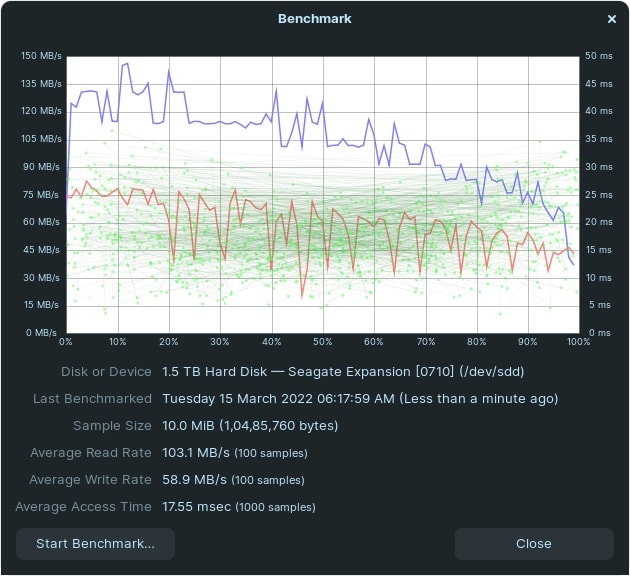
yabsis the best single command to benchmark disk speed on Linux and remote servers.ddandfioare powerful built-in and advanced options for any Unix system.- Linux has several graphical tools like KDiskMark and GNOME Disks.
- Always compare results before and after an SSD upgrade.
FAQ Section
-
Is Blackmagic Disk Speed Test free?
Yes, it is free and available on the Mac App Store. Or visit website Blackmagic Disk Speed Test -
Can I use yabs on macOS?
Yes, yabs runs on macOS and Linux, though some tests are Linux-focused. -
What is the difference between sequential and random disk speed?
Sequential speed matters for large file transfers. Random speed matters for operating systems and databases. -
Why is my Kingston M.2 SATA SSD slower than expected?
M.2 SATA SSDs are limited by the SATA interface (~600 MB/s). NVMe drives are much faster if the slot supports it. -
How do I clean up test files after benchmarking?
Delete temporary files withrmor ensure the tool has a cleanup option.
 Blackmagic Disk Speed on Mac with m2 Sata SSD